
New Clean Room For Data Recovery at nerdcore pc Systems Data Recovery - No outsourcing the work and over charging.
New Clean Room For Data Recovery at nerdcore pc Systems Data Recovery - No outsourcing the work and over charging.
What is a clean room? What is it used for in Data Recovery?

🔧 1. Mechanical Hard Drive Recovery
This is the most common use of a clean room.
Clicking or ticking hard drives
Failed or seized spindle motors
Damaged or misaligned read/write heads
Head crashes (platter contact damage)
Drives dropped while spinning
👉 The drive is opened, damaged components are replaced, and the platters are safely read.
🧠 2. Head Stack Replacement (Donor Part Swaps)
When the internal heads fail:
Replacement of read/write head assemblies
Matching donor parts from identical drive models
Calibration and alignment inside clean conditions
💽 3. Platter-Level Recovery (Advanced Cases)
Used when internal damage is more severe:
Platter inspection for scratches or contamination
Transferring platters into a donor drive (extreme cases)
Recovering data from partially damaged surfaces
⚙️ 4. Firmware & Service Area Repairs (Sometimes Clean Room Adjacent)
While firmware work is often non-
New Clean Room For Data Recovery at nerdcore pc Systems Data Recovery - No outsourcing the work and over charging.invasive, some cases require physical intervention:
Damaged firmware modules stored on platters
Service area access issues requiring internal repair
Drives not initialising due to internal corruption
🧊 5. Water, Fire, or Impact-Damaged Drives
Clean rooms are often required after environmental damage:
Flood or liquid exposure (corrosion inside drive)
Fire or heat-damaged components
Physically distorted or contaminated internals
❗ Important distinction
A clean room is not used for everything:
❌ Deleted files → software recovery
❌ Formatted drives → logical recovery tools
❌ RAID rebuilds (usually done outside clean room unless drives are physically damaged)
🧠 Simple summary
A clean room is used when:
The drive must be opened and physically repaired before any data can be recovered.
New Clean Room For Data Recovery at nerdcore pc Systems Data Recovery - No outsourcing the work and over charging.
Class 100 Clean Room Data Recovery Melbourne
When a hard drive fails physically, every second matters. Our Class 100 clean room data recovery service in Melbourne provides a controlled low-particle environment where damaged hard drives can be safely opened, inspected, and repaired while protecting delicate internal components from dust and contamination.
Physical hard drive failures often cannot be recovered with software alone. If your drive is clicking, has been dropped, is no longer detected, has suffered a head crash, or has internal mechanical damage, clean room recovery is often the safest path to recovering your data.
At Nerdcore PC Systems, we use specialist diagnostic tools, component-level repair techniques, and professional recovery procedures to stabilise damaged drives and maximise the chance of retrieving important files. This includes business documents, family photos, videos, archived projects, and critical work data.
Our Class 100 clean room data recovery service helps with:
Clicking hard drives
External hard drives that have been dropped
Drives not detected by computers or external enclosures
Damaged read/write heads
Seized spindle motors
Firmware-related drive failures
Mechanical hard drive failures from impact or wear
Every case begins with a professional assessment. We identify the type of failure, explain the recommended recovery path, and provide clear advice before any work proceeds. Our goal is to protect the drive, reduce the risk of further damage, and recover your data as safely as possible.
For businesses and home users across Melbourne, fast action can make a major difference. If your hard drive has failed, avoid repeated power-on attempts and arrange a professional assessment as soon as possible.
What must you wear inside a clean room?
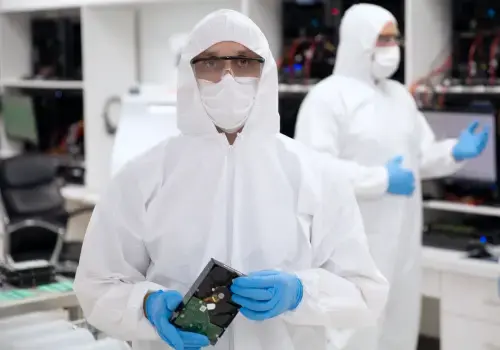
In a Class 100 (ISO 5) clean room, the goal is to prevent even tiny particles—dust, hair, skin flakes, fibres—from entering the controlled environment. Because of that, anyone entering must wear specialised protective clothing designed to minimise contamination.
🧤 What you must wear in a clean room
👕 Clean room suit (coverall or bunny suit)
Full-body, anti-static suit
Covers arms, legs, torso, and usually has a hood attached
Designed to trap particles from the body and prevent shedding into the environment
👞 Clean room footwear or shoe covers
Dedicated clean room shoes or sealed shoe covers
Prevents dust and contaminants from being tracked inside
🧢 Hood / head cover
Fully covers hair and scalp
Prevents hair and skin particles from contaminating sensitive drive components
😷 Face mask (or respirator in stricter environments)
Stops saliva droplets and breathing particles from entering the airspace
Also reduces contamination from talking or breathing directly over drives
🧤 Gloves (usually nitrile or latex)
Prevents skin oils and particles from touching hard drive components
Often required to be powder-free and changed frequently
🧼 Anti-static precautions (ESD protection)
Wrist straps or grounding systems in some setups
Prevents electrostatic discharge from damaging sensitive electronics
🧠 Why all this matters for data recovery
Hard drive internals are extremely sensitive—especially the platter surface, where read/write heads float just nanometres above. Even a single dust particle can cause:
Scratches on platters
Head crashes
Permanent data loss
Why does a clean room increase the chances of recovering your data?
A Class 100 clean room (also called ISO Class 5) gives major advantages for hard drive data recovery because it tightly controls airborne particles while the drive is open.
Main advantages:
Protects delicate platter surfaces — hard drive read/write heads fly extremely close to the platter. Even tiny dust particles can scratch the surface and cause permanent damage.
Reduces contamination during internal repairs — when replacing heads, inspecting platters, or doing component-level work, a controlled environment lowers the chance of introducing debris.
Improves recovery success rates — cleaner working conditions help preserve the original media and reduce the risk of additional damage during recovery.
Safer for mechanically failed drives — especially useful for clicking drives, head crashes, seized motors, and drives that have been dropped.
Allows precise internal work — technicians can safely perform platter inspection, head swaps, spindle work, and internal diagnostics.
Helps protect irreplaceable data — family photos, business files, archives, legal documents, and other critical information are less exposed to avoidable handling risks.
Why it matters: A normal office, workshop, or home environment contains far more airborne particles than a clean room. Once a hard drive is opened outside controlled conditions, contamination can quickly make a bad situation worse.
New Clean Room For Data Recovery at nerdcore pc Systems Data Recovery - No outsourcing the work and over charging.
What separates a clean room data recovery company from one that doesn’t is mainly how safely they can handle physically failed drives once the drive has to be opened.
A Class 100 / ISO Class 5 clean room provides controlled airflow and very low airborne particle levels. That matters because hard drive internals are extremely sensitive—dust, fibers, or tiny debris can damage platter surfaces or interfere with read/write heads during recovery.
Key differences:
Safer internal handling — clean room companies can open drives, inspect platters, replace heads, and perform internal mechanical work in controlled conditions.
Lower contamination risk — non-clean-room environments like offices, workshops, or benches usually have much higher airborne particle counts.
Better suited to physical failures — clicking drives, dropped external drives, seized motors, and head crashes often need internal work where contamination control matters.
Reduced risk of making the damage worse — every time a physically damaged drive is opened outside controlled conditions, the chance of further platter damage can increase.
More specialised recovery capability — clean room providers are generally equipped for advanced mechanical recoveries, not just software-based file recovery.
A practical way to think about it: A company without a clean room may still recover logical failures—deleted files, accidental formatting, partition corruption, or firmware issues that don’t require opening the drive.
But when the failure is physical, the clean room becomes much more important because the drive may need internal component work before the data can even be read.
One thing worth noting: having a clean room alone doesn’t guarantee success. Experience with donor parts, firmware work, diagnostics, and safe handling procedures still makes a major difference.
Get Fast Computer Repairs Services Today
Professional Computer Repairs. Same-day service available.
With over 1600 Reviews we are the go to choice for Data Recovery
What is a clean room in data recovery?
A clean room is a highly controlled environment where air particles, humidity, and contaminants are strictly regulated. It’s used when opening hard drives or storage devices that cannot be exposed to dust or airborne particles.
Why is a clean room needed for data recovery?
Hard drives and SSD components are extremely sensitive. Even a single dust particle can cause permanent damage to the platters or read/write heads. A clean room prevents contamination during internal repairs.
What types of data recovery require a clean room?
Clean room environments are typically required for:
Clicking or failing hard drives
Physically damaged drives (drop damage, head crash)
Motor or spindle failure
Water or fire-damaged drives (after initial stabilisation)
Platter swaps or donor parts replacement
What actually happens inside a clean room
Technicians may:
Open the hard drive safely
Replace read/write heads
Swap damaged internal components
Transfer platters to a donor drive
Perform imaging of recovered data
What must you wear in a clean room?
Technicians wear full anti-contamination gear, including:
Anti-static gown or suit
Hairnet and beard cover (if applicable)
Gloves
Shoe covers
Sometimes face masks or hoods depending on class level
What does “Class 100” clean room mean?
A Class 100 clean room means there are fewer than 100 particles (0.5 microns or larger) per cubic foot of air. This level is commonly used in professional data recovery labs.
Can all data be recovered in a clean room?
Not always. A clean room greatly improves the chance of recovery, but success depends on:
Severity of physical damage
Whether platters are scratched
Length of time the drive was damaged
Previous attempts to repair it outside a clean environment
How long does clean room data recovery take?
It varies:
Minor hardware repair: 1–3 days
Head replacement / imaging: 3–7 days
Severe damage cases: 1–3 weeks
Is clean room recovery expensive?
It can be more expensive than software-only recovery because it involves specialised tools, donor parts, and trained technicians—but it’s often the only option for physically damaged drives.
Can I open my hard drive myself before sending it?
No. Opening a drive outside a clean room usually introduces dust contamination and significantly reduces (or eliminates) recovery chances.
Nerdcore PC Systems provides a range of data recovery services, including:
💾 Hard drive data recovery (clicking, dead, or not detected drives)
🧲 Clean room hardware-level recovery (head swaps, platter work)
💧 Water and fire-damaged device recovery (where possible)
🗂️ Deleted or corrupted file recovery (software-based cases)
In short: we handle everything from simple file recovery to complex physical hard drive repair in a clean room environment.


